
Disability Liaison Officer
On the completion of a Learning, Educational Needs Summary (LENS) report by the Disability Service staff, the report will be shared with the relevant school-appointed Disability Liaison Officer, provided to the Disability Officer by the relevant school at the start of the academic year via the my.tcd.ie portal (SITS).
School DLOs can view individual LENS reports and query students with reasonable accommodations if required. School DLOs can also give permission to other staff in the School to view LENS information. It is the responsibility of the school to ensure that staff accessing this data have completed the relevant mandatory university GDPR training - Please review GDPR recommendations linked here.
- How will I know when a student has a LENS report?
- How to get a list of all LENS reports for your School
- How to access and view a LENS report for an individual student
- How to get a list of particular reasonable accommodations for your School
- How to add a new member of staff for school LENS access
- How to share a LENS report with a teaching academic, module/course owner
- How to Revoke Access
- How to Reinstate access to a LENS report
- How to email a LENS report
- Disability Service - SITS -Power Bi - staff Information Session
How will I know when a student has a LENS report?
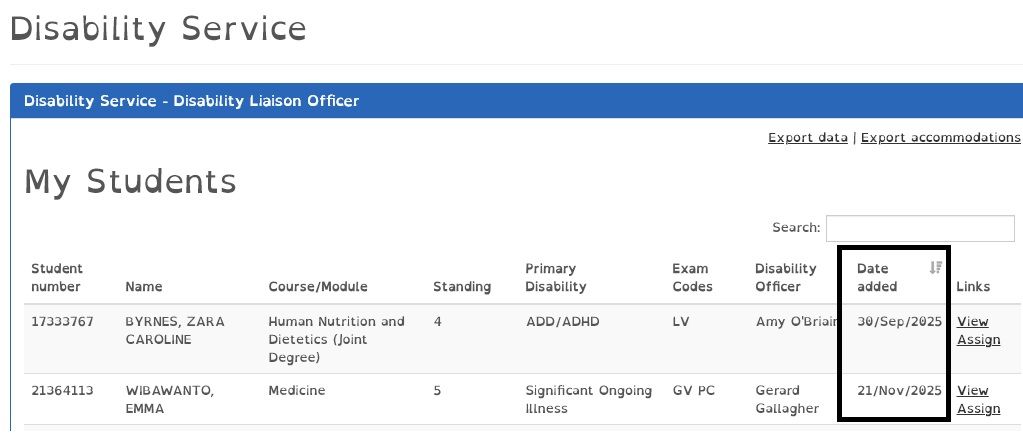
When a LENS report is approved by the student the student's LENS report will show in your "My Students view" under the Disability Service tab on the my.tcd.ie portal. The staff member can then sort by date added to show the latest student with a LENS report -
When a LENS report is released by the Disability Service, an email notification and an intray message with the my.tcd.ie portal will be received by the DLO:

How to get a list of all LENS reports for your School
- Log in to my.tcd.ie
- Clicking on the ‘Disability Service’ option on the main toolbar:

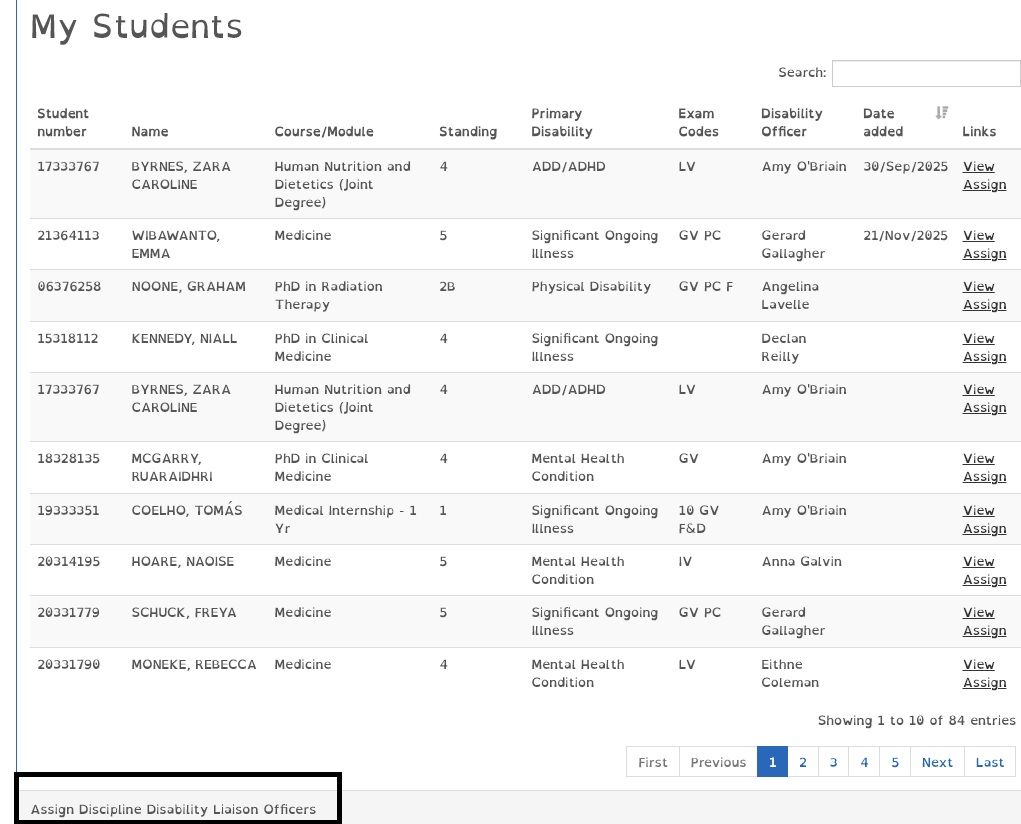
- A list of all students assigned to the Academic School is available to view:

- Click on the ‘Export data’ and an excel download will be displayed giving you the full list of students in your school.

How to access and view a LENS report for an individual student:
- Login to my.tcd.ie
- Click on the ‘Disability Service’ option on the main toolbar. A list of all students assigned to your Academic School is available to view.
- Select the student number
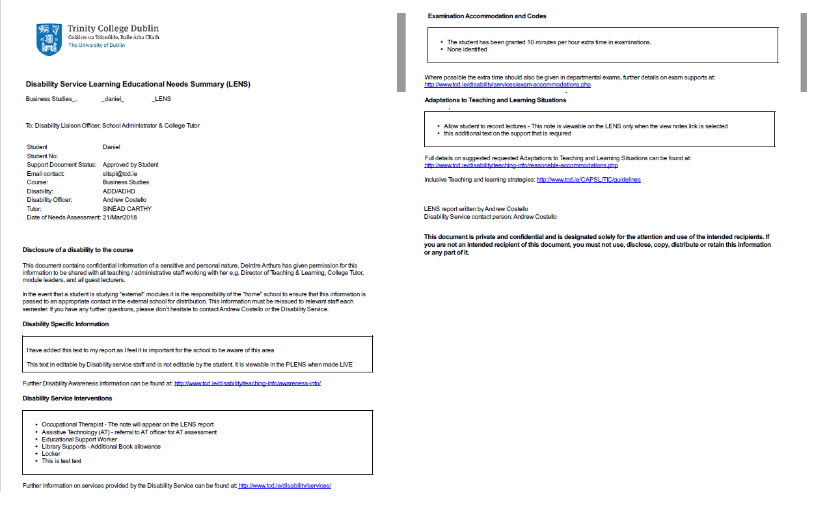
- Click ‘View’ and the student’s LENS will be displayed

How to get a list of particular reasonable accommodations for your School
- Login to my.tcd.ie
- Click on the ‘Disability Service’ option on the main toolbar. A list of all students assigned to your Academic School is available to view.
- Click on the ‘Export accommodations’

- Select the area of the LENS report you wish to view a list of accommodations from

- Excel spreadsheet created

Adding a new member of staff for school LENS access
The page will provide the steps needed in SITS by a school DLO to provide further access to all school or discipline LENS data for a school colleague.
The page will provide the steps needed in SITS by a school DLO to provide further access to all school or discipline LENS data for a school colleague.
It is the responsibility of the school to ensure that staff accessing this data have completed the relevant mandatory university GDPR training - Please review GDPR recommendations linked here.
- Login to my.tcd.ie
- Click on the ‘Disability Service’ option on the main toolbar. A list of all students assigned to your Academic School is available to view.
- Under the "My Students" pane, there is a link named "Assign Discipline Disability Liaison Officer access"
- Click on the assign button to set up a new school user or view the current access you have set up.
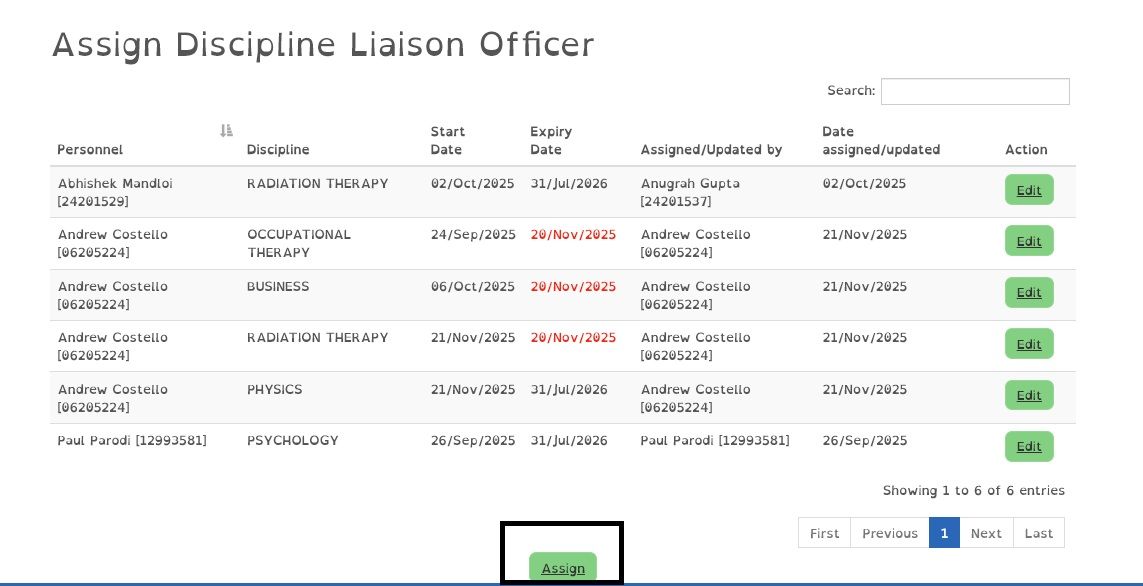
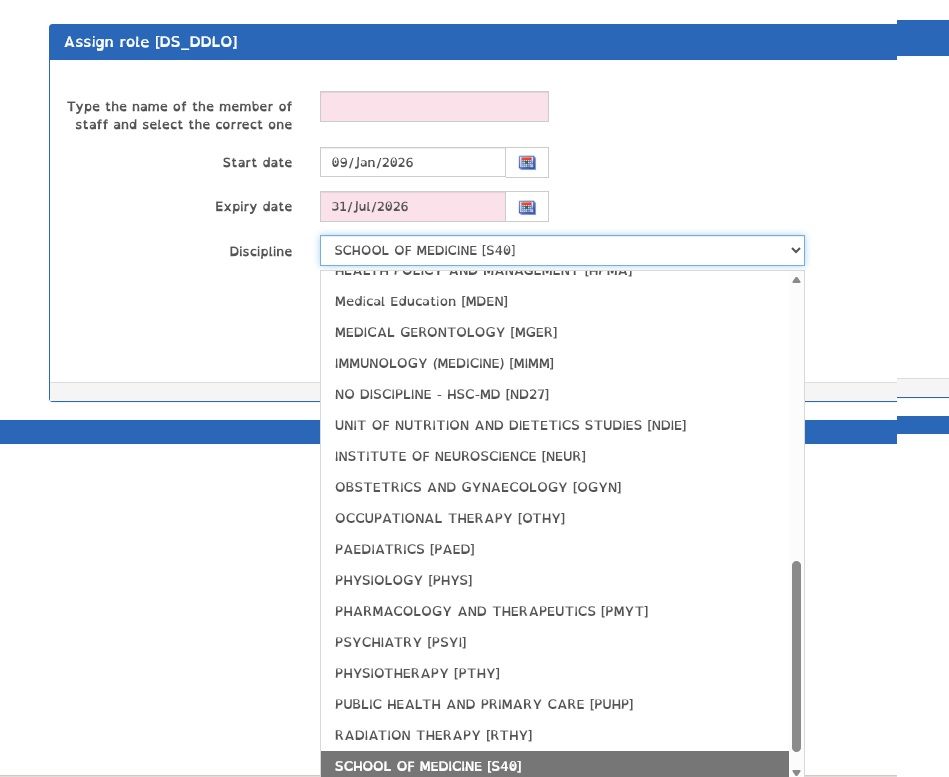
- Enter the staff member's TCD staff number and choose the discipline they need access to, or if they need access to all the school LENS data, choose the school name
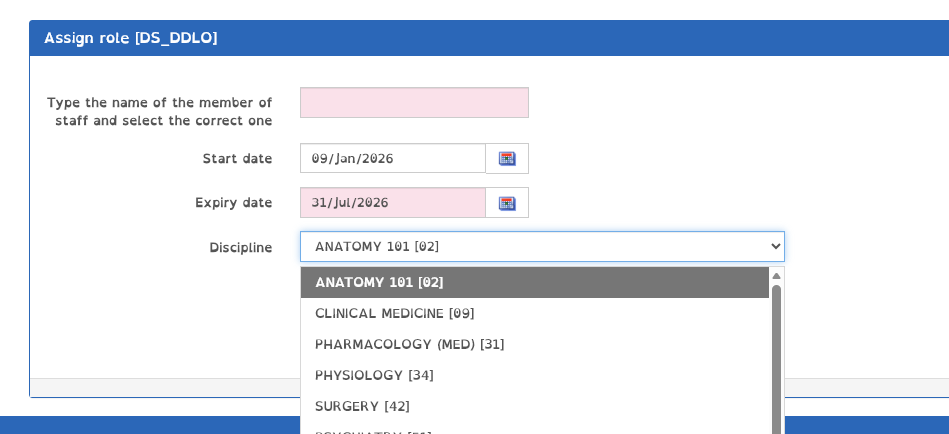
If they need access to all the school LENS data, choose the school name
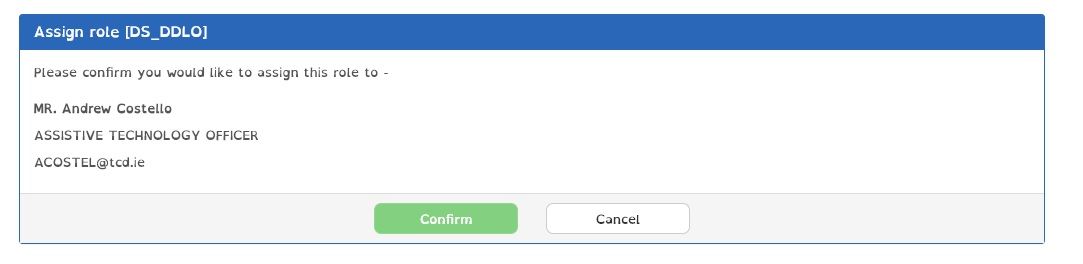
- Confirm the details are correct
- The new user now shows in the admin pane

Access lasts until the expiry date listed and will need to be renewed annually as required.
It is the responsibility of the school to ensure that staff accessing this data have completed the relevant mandatory university GDPR training - Please review GDPR recommendations linked here.
How to share a LENS report with a teaching academic, module/course owner
This allows a DLO to share a LENS report with a teaching academic, module/course owner via the my.tcd.ie portal and allows the DLO set permission on what an academic can access and for how long.
- Login to my.tcd.ie
- Click on the ‘Disability Service’ option on the main toolbar. A list of all students assigned to your Academic School is available to view.
- Select the student number
- Click ‘Assign’.

- You are presented with a view of current access rights to the student's LENS report. Note: You can select 'revoke access' to take away access rights

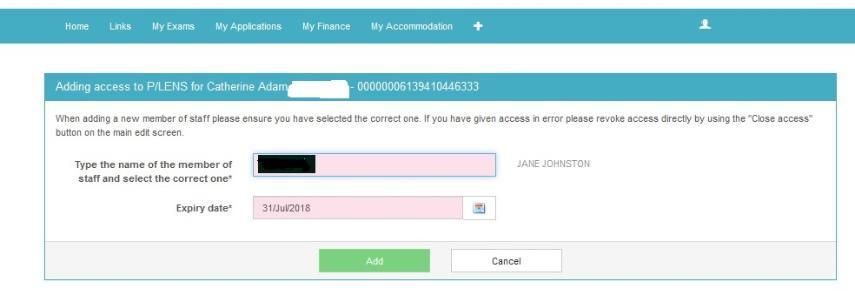
- Click ‘Add New’ to give the required level of access to the LENS e.g. read-only access

- Enter the academic or staff member to whom you wish to give ‘read access rights. Set the date you wish access to deactivate. Please note you may only set access within the current academic year. Once complete, click ‘Add’.

- You can choose to send an email to the academic’s TCD inbox to notify them of this access

How to Revoke Access
If required or if the academic no longer requires access you can highlight the academic's name and click 'revoke access.
- Login to my.tcd.ie
- Click on the ‘Disability Service’ option on the main toolbar. A list of all students assigned to your Academic School is available to view
- Select the student number to access the list of people who have access rights
- Highlight the academic’s name and click revoke access
- Note the expiry date will be automatically set to the time/date 24 hours before the current date.
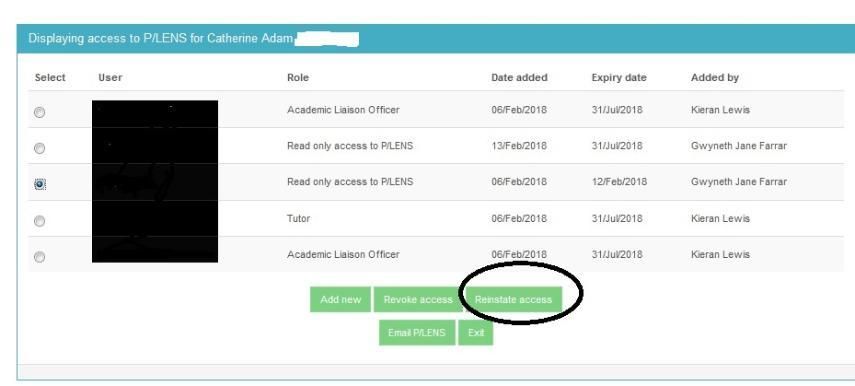
How to Reinstate access to a LENS report
If required a DLO can reinstate access to a record that has been deactivated.
- Login to my.tcd.ie
- Click on the ‘Disability Service’ option on the main toolbar. A list of all students assigned to your Academic School is available to view
- Select the student number to access the list of people who have access rights
- Highlight the academic’s name and click ‘Reinstate access’
How to email a LENS report
Note: LENS reports may only be distributed to those who have been approved by the student and who have a legitimate purpose in line with GDPR.
- Login to my.tcd.ie
- Click on the ‘Disability Service’ option on the main toolbar. A list of all students assigned to your Academic School is available to view
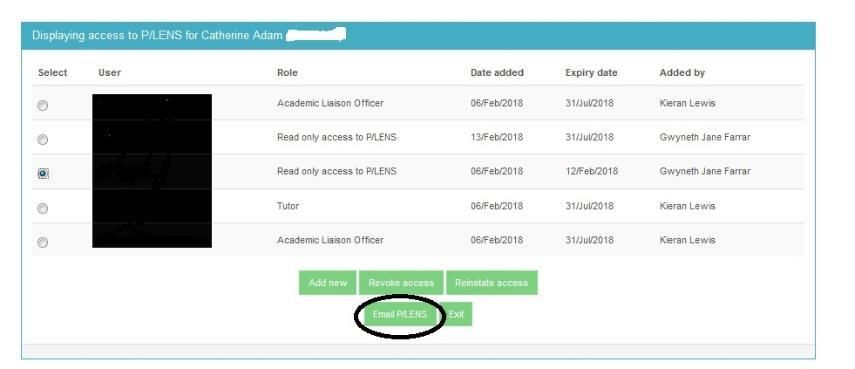
- Select the student number to access the list of people who have access rights
- Select ‘Email LENS’
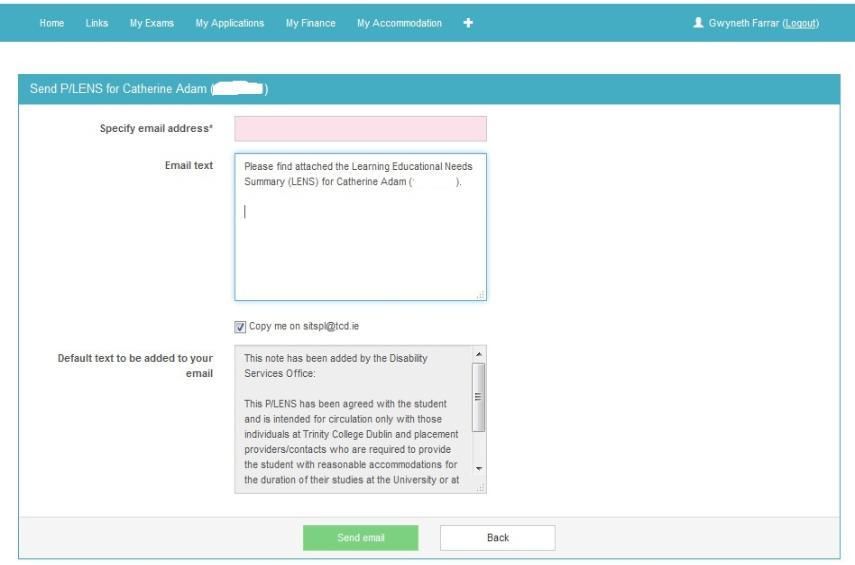
- Enter the text and the email address to which you want to send the report
Disability Service SITS - Power BI Staff Information Session
This session is for college school and academic staff advising on how the Disability Service TCD shares student LENS reports to nominated college staff.