Turnitin's New Standard Assignment with Enhanced Similarity Report
The New Standard Assignment with Enhanced Similarity Report has updated workflows, improved accessibility, and provides deeper insight into student submissions.
Benefits include:
- Redesigned Interface: A more accessible and intuitive layout that enhances usability.
- Streamlined Assignment setup: A cleaner, more responsive workflow for creating Assignments.
- New Match Type Categorisations: Matches are categorised into specific groups.
- Intuitive Match Grouping: The similarity report now categorises matches so you can easily distinguish between formatting errors and deliberate omissions.
Frequently Asked Questions
What do staff need to do?
Staff do not need to change anything. Existing Classic Standard Assignments will remain unaffected. When creating a Turnitin Assignment, Instructors will have the option to create a New Standard Assignment experience or to create the Classic Standard Assignment that you are currently used to.
When creating a New Standard Assignment, you will experience the upgraded, streamlined creation workflow with additional features, and student submissions will generate the newly redesigned Enhanced Similarity Report.
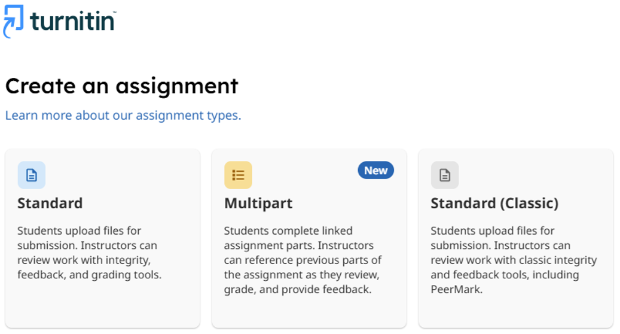
You will be provided with an option that allows you to select the assignment type you wish to create.
- Standard Assignment - Select to create a New Standard Assignment.
- Multipart - A Multipart assignment connects two or more assignment parts into one larger assignment workflow.
- Standard (Classic) - Select to create the Classic Standard Assignment that you are used to.
We will notify staff of upcoming training sessions, and guides will be available on our VLE Guides pages.
Staff can learn more about the New Standard Assignment and Enhanced Similarity Report here.
What advice do I give to Students?
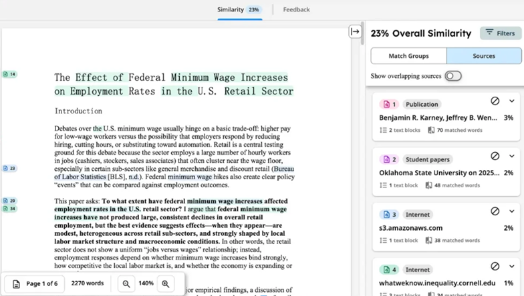
Students do not need to change anything. You will be able to submit to a Turnitin New Standard Assignment as normal. The Enhanced Similarity Report is an updated version of the similarity report with updated workflows, including a new categorisation of match types, new source cards with details about the highlighted match, and a new tab navigation that allows users to easily access different report functionality, such as the similarity and flags panel.
Students can learn more about the Enhanced Similarity Report here.
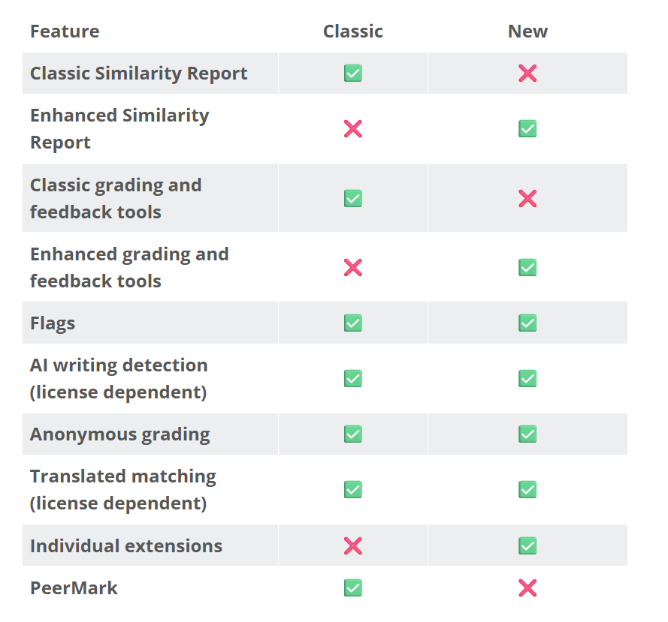
What is the difference between Classic and New Standard Assignment?
PeerMark Support: The Classic Standard Assignment is required for peer review (PeerMark) assignments, which are not yet supported by the new assignment type.
Anonymous grading in the assignment
Anonymous grading can be enabled in the assignment settings during assignment creation or while editing the assignment before a student submits it.
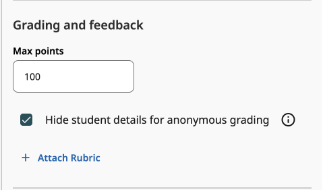
When enabled, student names are hidden from the submission list and from the Similarity Report. We are unable to hide student names that appear with the submission itself.
Once the feedback release date has passed, all students' names will be automatically revealed.