
Navigating Groups in your Blackboard module
Instructors can create student groups within a module. These groups consist of several students collaborating on shared projects or group assignments. Your instructor will either assign you to a group directly or allow you to select the group you want to join.
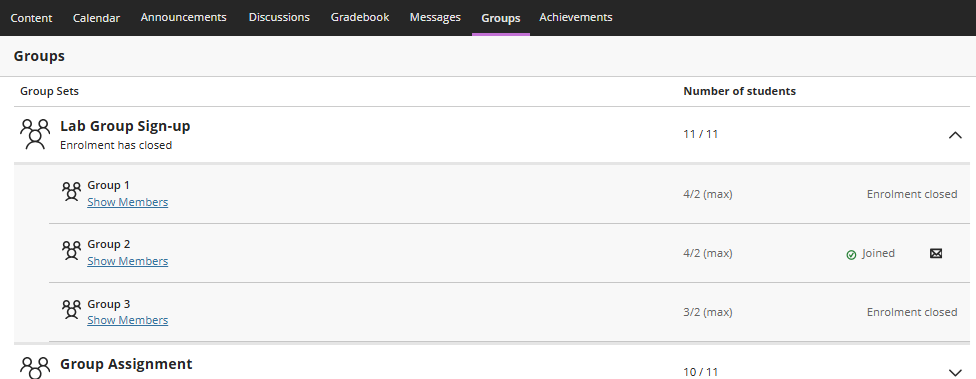
Groups are created within Group Sets. You can become a member of multiple groups within a module, but only join one group within a group set.
Navigating your Groups
To view your groups you are assigned to:
- Go to the Groups tab within your module.
- Any group that you are part of will be listed under the associated group set's name.
- Select the arrow next to a group set name to see the full list of individual groups.
- Select Show Members beneath your group's name to view the list of other students in your group.
- Click on your group's name to enter your dedicated Group Space, which lists any group assignments or discussions.
- If a Join link appears next to a group, it means you can choose to join or self-enrol into that group.
Using Group enrolment
On the Groups tab in your module, you can join or self-enrol in groups. Groups with an active sign-up/enrolment period appear along the top so you do not miss them. Your instructor may include a brief description of each group to help you choose which group to join.
Pay attention to whether an enrolment end date is set, and ensure you enrol within the time specified by your instructor.
Important note on Enrolment dates: If you do not manually choose a group before the sign-up period ends, the system will automatically enrol you in a group. Instructors can choose to hide or show group members, depending on how the groups are set up.
You will stay informed about group sign-ups through:
- Module Announcement - Prompts will appear within the Announcements section of your module when action is needed to join a group.
- Activity Stream - A notification will be delivered directly to your feed when you need to sign up for a group.