
Blackboard has updated the interface to make navigation clearer and easier to follow. Note: Module content and structure remain the same. Instructors do not need to redesign or reconfigure anything.
The Sections Inside Your Ultra Module
Navigate between modules faster with the updated Home button
When users select the Home button to leave a module, they now return to the Modules page in the base navigation rather than the institution pages, making module-to-module navigation faster.

Switch between Modules
You can quickly jump between your four most recent modules or go to the full Modules page by using the module switcher near the top corner of your module. Select Modules to open a dropdown menu with four modules. Selecting a module option takes you directly to that module. Additionally, the Module Switcher includes a search box and Favourites tab that allows users to quickly find and open any course they have access to. You can search by module name or ID and navigate directly to the selected module.
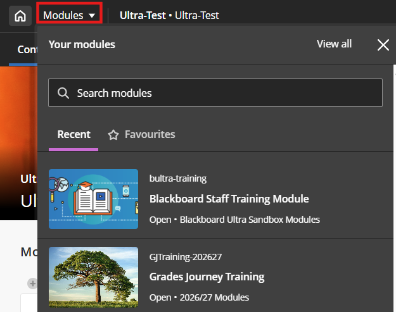
Module ID and Name in Header
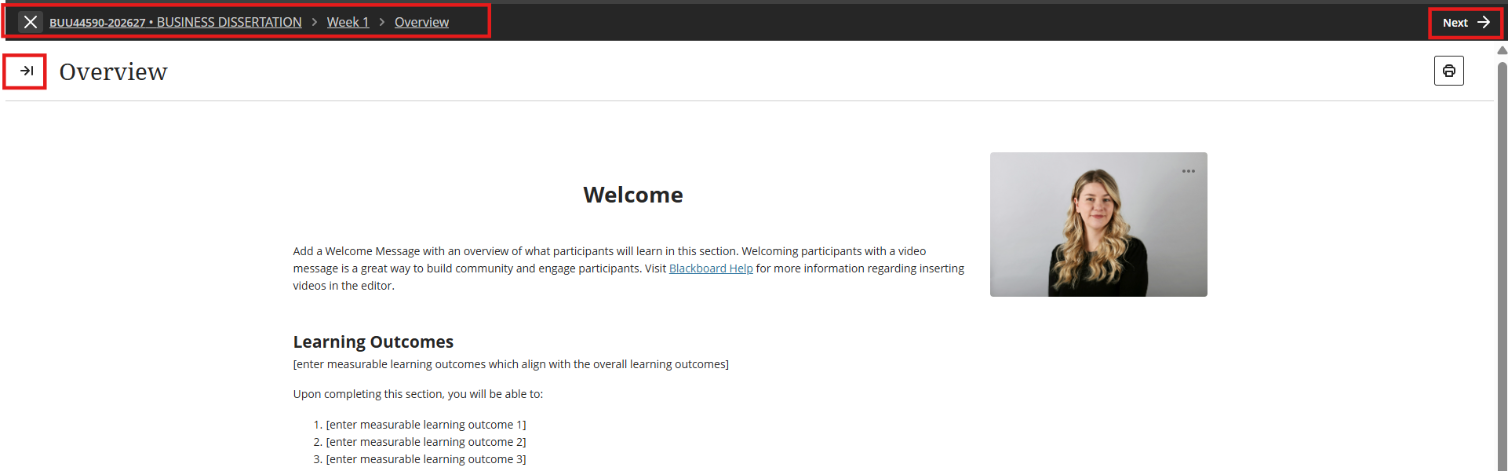
Your module's ID and name now appear in the top header bar. Click at any time to return to the main module page. Additionally, clickable breadcrumb links now appear on content pages, showing your exact path from the home page through the folder structure for easier navigation.

Exit your Module
The purple "X" button previously used to exit content is replaced with a clearly labelled exit option in the navigation banner. Because the exit action is separated from other controls, you are less likely to close a page or lose your place by accident.

Full-page content navigation
Learning topics, folders, and individual content items—such as documents, assessments, links, and media—now open as full pages instead of sliding panels layered over the module outline. Click an item, such as a folder or an Ultra document, in the learning topic, then use Next (at the top right) to navigate to and view the module content.
Focus state for tests and assignments (Students)
When students start a test or assignment, they automatically enter Focus Mode, which hides navigation elements and visual clutter. It doesn't alter how assessments function and are graded, and students can navigate away at any time - reducing distractions without locking them in.