
How to install Microsoft 365 Desktop Apps
You can install desktop versions of some Microsoft 365 Apps on up to five devices including your computer or mobile device.
Installing Microsoft 365 Desktop Apps on macOS
For macOS users, the Microsoft 365 Desktop Apps should only be installed on supported versions of macOS. If you install the desktop Apps on a non-supported version, they do not work properly.
To install desktop versions of Microsoft 365 Apps on your Windows or Mac computer:
- Log into office.tcd.ie using your Trinity email address (in the form username@tcd.ie) and password
- Click on the 'Apps Launcher' (or 'waffle') icon in the top-left of the screen.
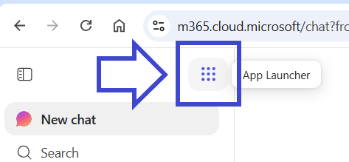
- Then click on 'More apps'.
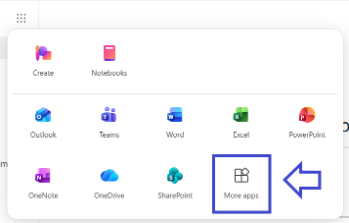
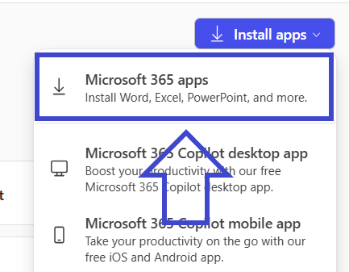
- On the top-right of the screen, click the 'Install apps' dropdown.

- From the dropdown menu, click the first option - 'Microsoft 365 apps'.
- This will bring you to a new page. On this new page, click the 'Install Office' button.
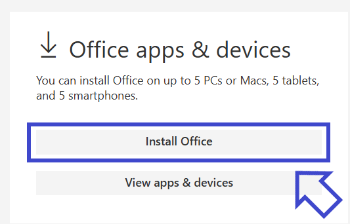
- This will download an 'Office' setup file to your computer. Running this setup file will install desktop versions of all common applications such as Word, Excel and PowerPoint on your computer.