
Blackboard Student Timetable
The Blackboard Student Timetable provides students with a timetable calendar within Blackboard. Students can view the time, location, and lecturer for each of their classes.
The Blackboard timetable is updated only once a day. If students are unsure if the information is accurate, they should double-check it against their timetable, which is available in SITS (https://my.tcd.ie). Please note that student timetables are subject to regular updates. Further details about student timetables can be obtained from each School or Course Office. If you are in doubt about the accuracy of your student timetable, please check it on SITS (https://my.tcd.ie).
Blackboard VLE - iCal Timetable Link
This functionality enables students to synchronise their student timetable with their MyZone Calendar or any other external calendar service.
This timetable may take up to 24 hours to receive updates regarding changes to timetabled events. If you are ever in doubt, double-check on my.tcd.ie and use the information that is available there.
Instructions on how to sync your timetable
- Log in to Blackboard
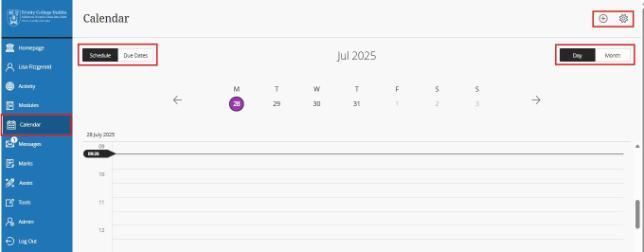
- On the menu on the left-hand side of the page, select Calendar
- Select Calendar Settings on the top right of your screen
- Open the menu (...) next to the Calendar Settings heading and select Share Calendar
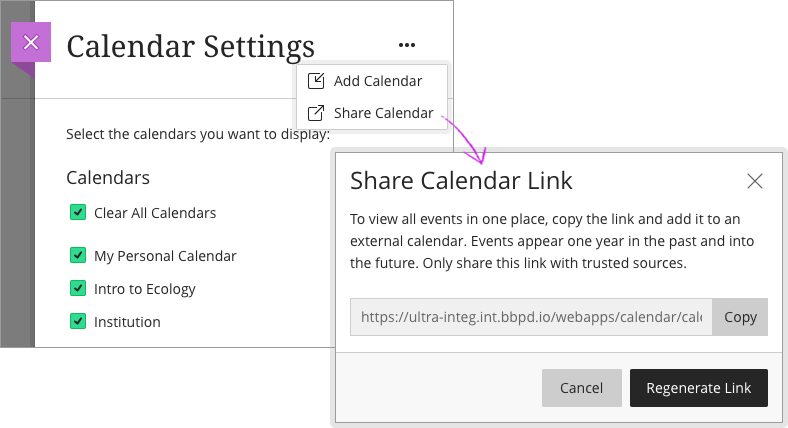
- Click on the Copy button next to the URL.
- Log in to your MyZone email account and then navigate to your Google Calendar.
- Click on the + symbol on the left-hand side of the page (beside “Add a colleague’s calendar”) and then click "From URL".
- Paste your timetable link into the box and then click "Add Calendar". It may take a few minutes for your timetable to appear.
- If you have your MyZone email account linked to your mobile device, you should now be able to view your timetable on your device's calendar app.
Blackboard Student Timetable - Frequently Asked Questions
How often is the Blackboard student timetable updated?
The timetable is updated daily. This update occurs overnight.
Who can view the timetabled classes?
Every student with timetabled classes and access to Blackboard will be able to view their classes. Students should not use each other's timetables, as they may have different classes.
What if the information in the Blackboard student timetable doesn’t match the SITS timetable?
If the information in your Blackboard timetable doesn’t match the information in your SITS timetable, use the information in the SITS timetable. After the next overnight refresh, the two timetables should be in sync with each other.
Can I use the Blackboard timetable calendar for personal use?
You can use the Blackboard student timetable calendar for personal use; however, this is not recommended, as we cannot guarantee that events you have entered will be retained when the timetable is updated.
Why can I edit and delete timetabled classes?
The Blackboard student timetable uses the Blackboard personal calendar as a base for storing timetabled classes. As a result, students can edit and delete these classes on the timetable. This will only impact the student’s own Blackboard student timetable, and these deleted or edited classes will be restored to their original form after the timetable updates overnight.
Why are there duplicate classes on my Blackboard student timetable?
This has occurred due to an error. If this happens, please contact the IT Service Desk.