
Mapping Weighted Columns
Grades Journey weighted columns start with SEQ are named based on information that's automatically in SITS. They will also have a sequence number, depending on the number of assessment components in SITS, which will be numbered 001, 002, 003, 004, 005 and so on.
An example of a type of assessment component is as follows: CWN stands for "coursework by name". Therefore, the completed column name will appear as SEQ 001 - CWN.
Mark Assessment Columns out of 100
Ensure that all columns being used in the weighted columns are being marked out of 100. If they are marked out of something else, it is likely the weighted column will calculate an incorrect mark/grade.
How to find the SEQ columns in the Gradebook
When the SEQ columns have been created, you can find them within either the Markable Items or Marks view of the Gradebook. Look for the columns titled in the format SEQ 001 - CWN.
Under Gradebook, use the toggle to choose between Gradebook screens
- Grid view (Marks): a table of students and grades.
- List view (Markable Items): every markable item in your module.

In the Grid view (Marks), find the relevant column and click on the folder icon at the top of the column to edit.
In the List view (Markable Items), find the relevant Total or Calculation column in the list and the three dots (the ellipsis). Select Edit.
This screen will be the next to open.
- All assignments must be marked out of 100.
- Do not change the title of the column or the mark schema. Changing this will prevent marks from transferring from the Gradebook to SITS.
- To avoid confusion, always keep the Grades Journey column hidden from students.
- SITS will provide the description for the assignment.
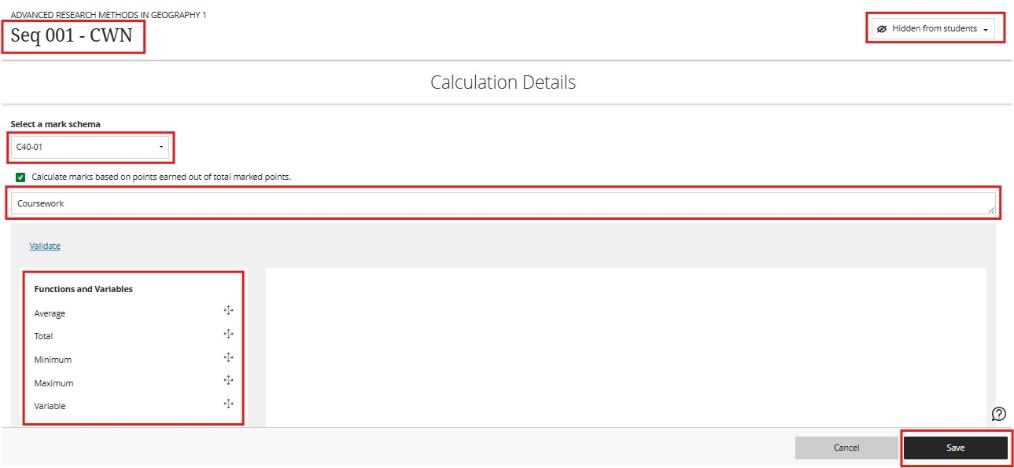
Calculate marks based on points earned out of total marked points (also called a "running total"). This calculates a student's overall mark as the running total of the points they've earned, divided by the total points possible for the assignments in the weighted columns.
- Option Checked: This option is switched on by default. The overall grade is a running total calculated only using assignments that have been submitted and marked. Missing or ungraded assignments are ignored.
- Option Unchecked: The overall grade is calculated based on all assignments in the weighted column. Any assignment the student hasn't submitted yet (or you haven't marked) is treated as a zero.