The New Standard Assignment with Enhanced Similarity Report has updated workflows, improved accessibility, and provides deeper insight into student submissions, and is now available for use in the new Academic Year 2026/27.
Key benefits include:
- Redesigned Interface: A more accessible and intuitive layout that enhances usability for instructors and students.
- Streamlined Assignment setup: A cleaner, more responsive workflow for creating Turnitin Assignments and improved accessibility.
- New Match Type Categorisations: Categorises matches into specific groups.
- Intuitive Match Grouping: The similarity report now categorises matches (e.g., Missing Citations or Not Citied/Quoted) so you can easily distinguish between formatting errors and deliberate omissions.
What staff need to do:
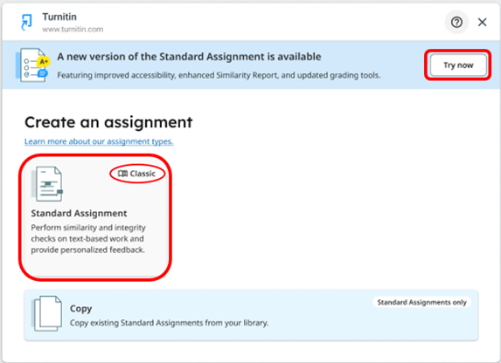
Staff do not need to change anything. Existing Classic Standard Assignments will remain unaffected. When creating a Turnitin Assignment, Instructors will have the option to create a New Standard Assignment experience or to create the Classic Standard Assignment that you are currently used to.
When creating a New Standard Assignment, you will experience the upgraded, streamlined creation workflow with additional features, and student submissions will generate the newly redesigned Enhanced Similarity Report.
You will be provided with an option that allows you to select the assignment type you wish to create.
- New Standard Assignment - Select the "Try Now" button on the top blue banner.
- Classic Standard Assignment - Select the Standard Assignment tile with the Classic
We will notify staff of upcoming training sessions, and guides will be available on our VLE Guides pages.
Staff can learn more about the New Standard Assignment and Enhanced Similarity Report here.
What students need to do:
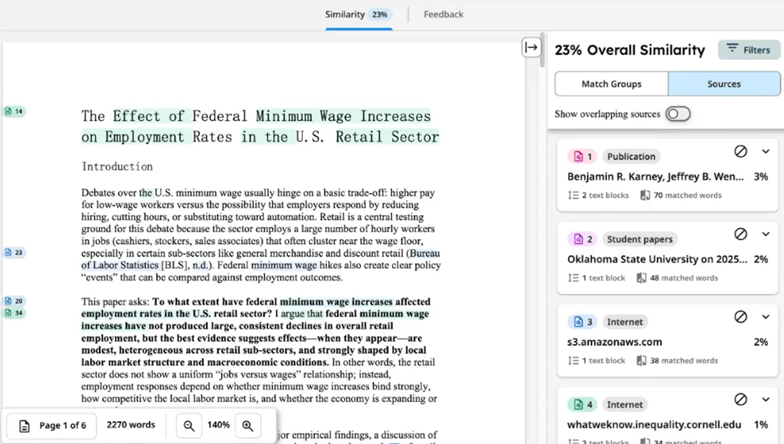
Students do not need to change anything. You will be able to submit to a Turnitin New Standard Assignment as normal. The Enhanced Similarity Report is an updated version of the similarity report with updated workflows, including a new categorisation of match types, new source cards with details about the highlighted match, and a new tab navigation that allows users to easily access different report functionality, such as the similarity and flags panel.
Students can learn more about the Enhanced Similarity Report here.
If you have any questions or queries, please contact the Teaching & Learning IT team via the service desk email itservicedesk@tcd.ie or via assist.tcd.ie web portal.