
/filters:format(webp)/filters:quality(100)/prod01/channel_3/media/tcd/itservices/images/news/rss-major-collaborations-main-image.png)
This update makes it easier to categorise, manage, and connect your collaborations with your research projects, providing greater visibility and insight into your work.
Accessing the feature
You can access the "Creative Practice" -> "Collaborations" landing page here: https://tcdlocalportal.tcd.ie/pls/EnterApex/f?p=115:265
How to Get Started
To begin using this feature:
- Visit the RSS Creative Practice Major Collaborations page
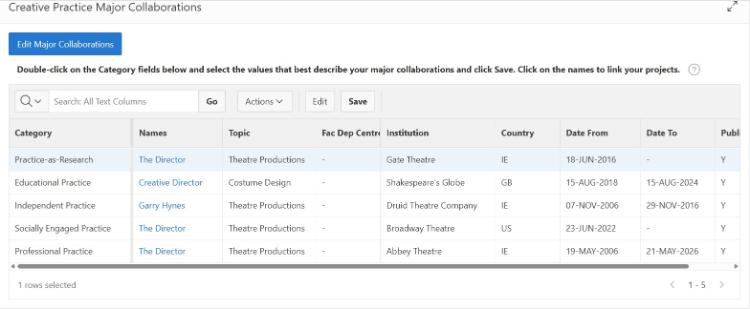
- Click on "Edit Major Collaborations" followed by "Add Collaboration" to begin adding your collaborations
- Categorise your collaborations using the available framework options
- Link collaborations to projects by updating the “Linked to Collaboration” field
- Explore the dashboard to view and review your linked projects
Key Features
Align Collaborations with Framework Categories
You can now categorise your Major Collaborations under the Creative Practice Framework, which includes the following categories:
- Practice-as-Research
- Professional Practice
- Socially Engaged Practice
- Educational Practice
- Independent Practice
Link Collaborations to Research Projects
The system also enables you to link your Major Collaborations directly with your RSS Research Projects. This integration provides a more complete overview of your research activity.
Enhanced Dashboard and Visual Insights
The Creative Practice Home Page has been updated to support these changes. It now includes:
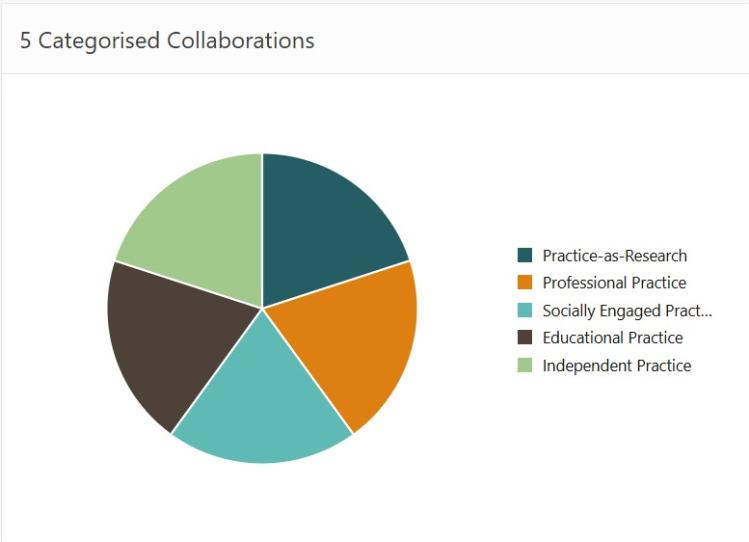
- A visual chart showing your Major Collaborations by category
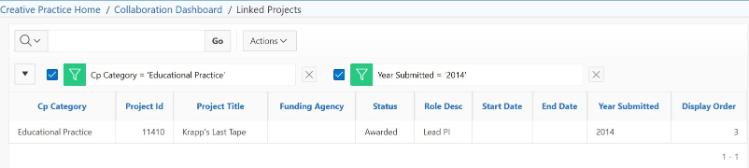
- A list of collaborations linked with research projects
- Access to a Collaboration Dashboard, where you can view charts of linked projects
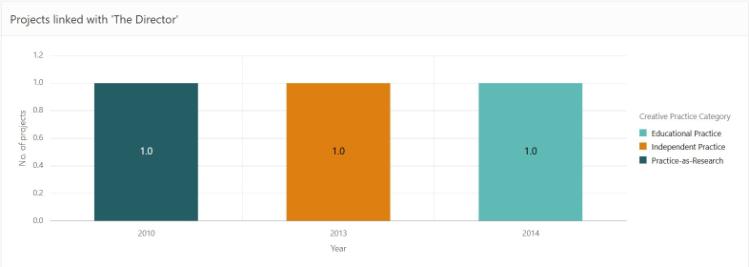
These features help you track and analyse your collaborations more effectively.