
/filters:format(webp)/filters:quality(100)/prod01/channel_3/media/tcd/itservices/images/news/end-of-life-of-SP-2016.png)
SharePoint 2016 is an on-premises version of SharePoint, a different platform to SharePoint in Microsoft 365. Please note that SharePoint in Microsoft 365 will not be affected by this change.
IT Services have contacted affected areas
There are a number of SharePoint 2016 sites still being used in Trinity. Since the beginning of the year, IT Services have contacted Heads of affected areas, who have received emails from IT Services Messages with details on what they need to do ahead of the service decommissioning in July 2026.
If you have received an email about SharePoint 2016 decommissioning but have not yet responded to IT Services, we would appreciate if you could let us know via itservicedesk@tcd.ie when you have reviewed your site and dealt with any remaining files.
SharePoint Migration Tool
If you are looking into bulk-moving items from SharePoint 2016, Microsoft offers a tool called SharePoint Migration Tool, a self-service technology that may help you as you move your files. While IT Services do not provide support for using the SharePoint Migration Tool, we have put together some information to be aware of before using the software.
How do I know what version of SharePoint I am using?
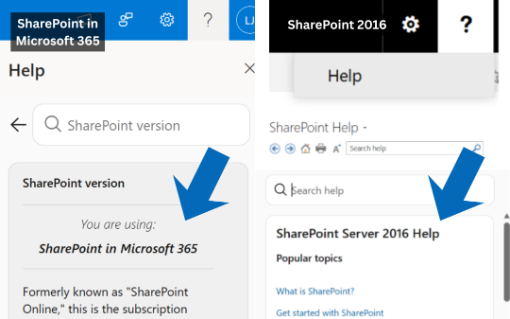
You can check what version of SharePoint you are using by going to the Help menu (?) on the top right of SharePoint.
For SharePoint in Microsoft 365, you can type ‘SharePoint version’ in the search field, which will bring up your answer.
For SharePoint 2016, when you click on Help, a pop-up window will open with the heading ‘SharePoint Server 2016 Help’.
If you have any queries, please contact our IT Service Desk via itservicedesk@tcd.ie.