
How to share your Panopto-created videos
Sharing Lecture Recordings within a module in Blackboard
For lecturers who have recorded lectures in Blackboard under a module, students enrolled in that module will, by default, have access to those recordings; they will see them when they click their module.
Other Users
For lecturers who have recorded lectures in Blackboard for a module and want to share them with other users outside the module's enrolled students.
- Click on the module or folder where you have your recording
- Highlight the lecture you would like to share and click on the Share button
- Click on Add People and Groups and type in the person's email address you'd like to invite to view the lecture recording
- The targeted person will receive an email invitation to view the lecture recording
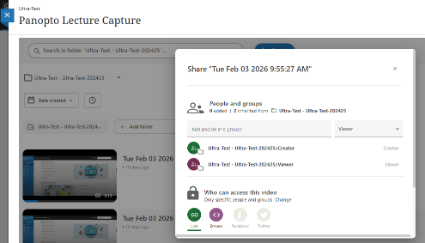
Videos inherit sharing permissions from the folder they are located in. Depending on the sharing permission set for the folder, the sharing permission options for videos may change and will appear as follows:
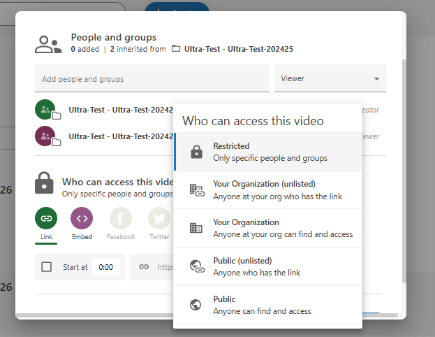
- Restricted
- Your Organisation (unlisted)
- Your Organisation
- Public (unlisted)
- Public: If your parent folder is set to Public, videos in that folder will be Public as well and cannot be changed.