
Talis MyReadingList
Talis MyReadingList is a service supported by the TCD Library team that helps you to manage your module reading lists efficiently and improve your students' learning experience. It can provide students with real-time information on the availability of reading material and full-text access to electronic resources. You can add MyReadingList to your Blackboard module to make it easy for students to access their list alongside other module material.
Additional Information
Benefits of MyReadingList for Teaching & Learning
You can use MyReadingList to:
| • Create dynamic and up-to-date reading lists |
| • Initiate the selection and purchase of library material with a single click |
| • Harvest items from the web, including blog posts, web pages and videos |
| • Organise and annotate reading lists to suit your module structure |
| • Ensure teaching resources are available at all times |
| • Integrate reading lists into your module on Blackboard |
| • Increase student satisfaction with your module by simplifying access to material |
Adding MyReadingList to Your Blackboard Module
Once you have set up MyReadingList following the steps on the Library website, you can link it to your Blackboard module for easy access by your students. You will also need to link to your list again in your new modules after the yearly Blackboard rollover each summer.
Under Details and Actions on the right-hand side of the screen, you will find a link to Third Party Tools. The window that opens lists available tools, including Blackboard Ally, MyReadingList (Talis Aspire), Panopto, Turnitin, and Grades Journey.
Check Your Reading List
If you haven't already, ensure you link to your MyReadingList. Go to Third Party Tools
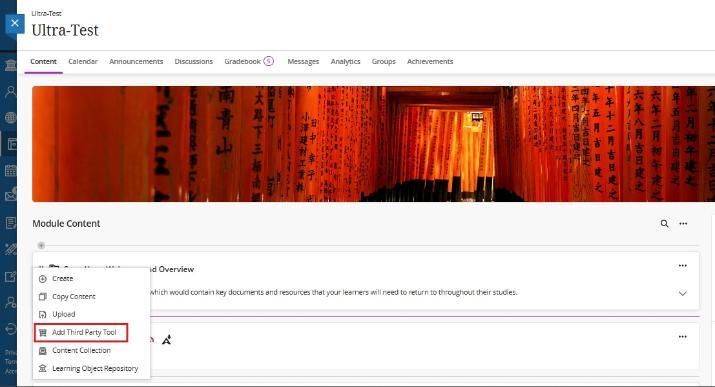
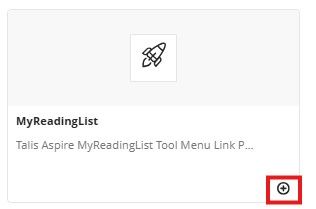
If you don't have a link to your reading list in your course, click the + icon in your main module content, select Add Third Party Tool, and choose MyReadingList.
If you would like to start using MyReadingList@TCD, need further guidance, or have any questions, please contact your Subject Librarian: https://www.tcd.ie/library/support/subjects/.
You can also contact the MyReadingLists@TCD project team directly:
Caroline Montgomery, MyReadingList Project Manager
E-mail: cmontgom@tcd.ie
Telephone: +353 1 896 2985
If students or staff are experiencing issues accessing Blackboard or specific modules, please contact the Teaching & Learning IT team via the IT Service Desk by one of the following methods.
You can email the service desk at itservicedesk@tcd.ie. Please ensure you fill in the 'Subject' field with Ultra: when emailing.
Service desk opening hours are:
Monday - Friday: 09:00 - 17:00