
Frequently Asked Questions
Find answers to some of the most common questions about equality, diversity and inclusion at the School of Social Sciences and Philosophy.
Can't find what you're looking for? The EDI team are happy to help.
Dignity, Respect and Consent
As a member of the Trinity community, you have the right to work or study in an environment which is free from bullying, harassment, and sexual misconduct. Speak Out provides the opportunity for you to make the University aware of incidents that you have either experienced or witnessed by reporting them anonymously. The Speak Out tool can be found here>>
The Dignity, Respect & Consent (DR&C) Service provides information and support about the Dignity & Respect and Sexual Misconduct policies and processes to Staff. This information can be found here>>
The Dignity, Respect & Consent (DR&C) Service provides information and support about the Dignity & Respect and Sexual Misconduct policies and processes to Students. This information can be found here>>
Use the Booking Form to request an appointment with a Dignity Respect and Consent Support Advisor.
A disclosure refers to the case where an individual discloses that they feel they have been subjected to bullying, harassment, and/or sexual misconduct. Making a disclosure does not constitute raising a complaint, however you may decide to submit a complaint after seeking advice from the DR&C Service. Information on how to make a disclosure as a staff member can be found here>>
Information on how to make a complaint as a staff member can be found here>>
A disclosure refers to the case where an individual discloses that they feel they have been subjected to bullying, harassment, and/or sexual misconduct. Making a disclosure does not constitute raising a complaint, however you may decide to submit a complaint after seeking advice from the DR&C Service. Information on how to make a disclosure as a student can be found here>>
Information on how to make a complaint as a student can be found here>>
Disability Services
All students registered with the Disability Service have a LENS (Learner Educational Needs Summary) report. This outlines agreed reasonable accommodations and is visible to authorised academic and administrative staff under the “My Disability Service” tab.
Once the student has approved their LENS report within their my.tcd.ie portal the report will automatically be available for the module coordinator to view. Module coordinators can review individual LENS reports and a list of students with reasonable accommodations.
There are three ways to view student LENS information:
- Individual student LENS with all accommodations: Click ‘View’ and a page will open with the students LENS report. The important information is noted in the sections titled ‘Examination Accommodation and Codes’ and ‘Course Reasonable Accommodations’.
- Student list with examination accommodations: Click ‘Export accommodations’ and select ‘Examination accommodations and codes’ from the drop down, click the 'Retrieve' button and tick all the boxes on the screen, click the 'Export' button and an excel workbook will download to your PC. This will display the full list of students assigned to you, along with their examination accommodations as listed on their LENS.
- Student list with course accommodations : Click ‘Export accommodations’ and select ‘Course reasonable accommodations’ from the drop down, click the 'Retrieve' button and tick all the boxes on the screen, click the 'Export' button and an excel workbook will download to your PC. This will display the full list of students assigned to you, along with their course accommodations as listed on their LENS.
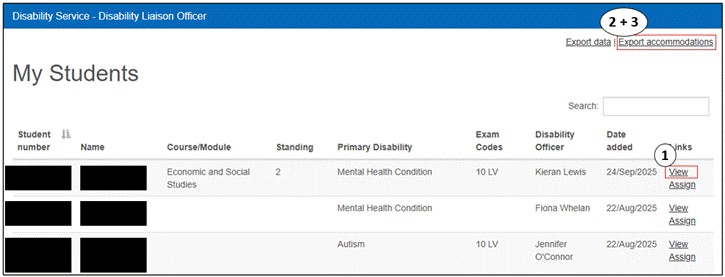
Note: Downloading the reports may take upwards of 2 minutes. Your browser tab will keep loading and it may look like nothing is happening. It will work and the report will appear in your downloads.
Note: The new ‘Late Submission of Assessments (Extensions) Policy’ course accommodation can be viewed by following the directions in point 3 above and ensuring you tick the last tick box on the page. The numbers are very small across the school and each student can be contacted individually.
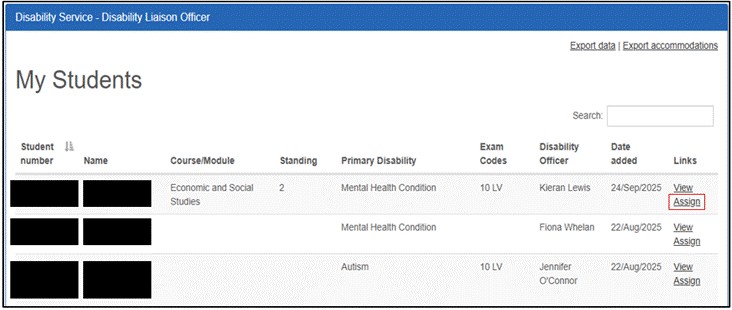
In the ‘My Students’ section, click ‘Assign’ and a page will open with a list of users who have access to the LENS report.
Click the 'Add new' button at the bottom of the screen and start typing the name of the staff member into the search box. The staff member and their staff ID will pop up, ensure you select the correct one. This will share the LENS report with your teaching colleague. Please note that may not work for Teaching Assistants and if it doesn't, follow the steps below.
To share information relating to student accommodations with a Teaching Assistant (internal or external to Trinity College) you should do so through One Drive.
The easiest way to do this is to share a copy of the course accommodations and examination accommodations reports from SITS (instructions on how to download, as above).
Create a new folder in your One Drive, save the reports in the folder, right click on the folder and select the ‘Manage Access’ option.
Click ‘Share’ or ‘Start Sharing’ and type in the Teaching Assistant’s email address.
LENS reports continue to be prepared by the Disability Service throughout the year. When you receive a notification from SITS, it is important to re-run any reports you have downloaded to ensure you have the most up to date list of students requiring course or exam accommodations.
Note: Make sure to update any shared One Drive folders with the new reports.
The Disability Service has lots of information on their website for Teaching and Professional staff which can be found here>>
Information for staff with disabilities can be found here>>
The Disability Service has lots of information on their website for students:
Prospective students can find information here>>
Current students can find information here>>
Additional supports and resources can be found here>>
Disability Service FAQs can be found here>>
Policy and leave entitlements
The HR Policies page can be found here>>
You will find information on the below policies and procedures, plus much more.
- Adoptive Leave Procedure>>
- Breastfeeding Guidelines and Procedures for Staff
- Carers Leave Policy
- Dignity and Respect Policy
- Equality Policy
- Force Majeure Leave
- Maternity Leave Policy
- Parental Leave Policy
- Parent's Leave Policy
- Paternity Leave Policy and Procedure
The HR Policies page can be found here>>
You will find information on the below policies and procedures, plus much more:
- Academic Freedom Policy
- Gender Identity and Gender Expression Policy
- Meeting Hours Policy
- Sexual Misconduct Policy
Race Equality
The Trinity College Race Equality Action Plan can be found here>>
Training
Equality, Diversity, and Inclusion in Higher Education can be accessed here>>
Let's Talk About Race in Higher Education can be accessed here>>
Equality and Human Rights in the Public Service can be accessed here>>
Sexual Violence and Harassment: How to Support Yourself and Your Peers can be accessed here>>
Supporting Trauma Informed Responses to Sensitive Disclosures can be accessed here>>
LinkedIn Learning can be access here>>
Trinity College Staff training website can be access here>>
Trinity College Student training website can be access here>>