

Support
Note: from EN20 the interface of the program has changed from prior versions, so it looks different, but works much the same, with the same features. The vast majority of current EndNote features are available in EndNote X7 onwards. Therefore using older training videos or guides is normally fine as a starting point.
Videos and Tutorials
See our own overview of installing and using EndNote 20/21:
Recording - Introduction to EndNote 21 Desktop
Most people then continue with EndNote's own instructional videos - there are pages and pages of very short videos that tell you how to do very specific things with it, plus longer overview ones. There is also a text-based guide for Windows and guide for Mac.
If you are using X9 or lower, take a look at the LinkedIn Learning course (free to Trinity members).
Other Documentation
- How to combine chapters in Word
- TCD Beginner's Guide to EndNote Online
- How to Add Multiple Bibliographies
- Using Footnotes with EndNote (video)
- Using EndNote for Systematic Reviews
Additional Resources (including Trinity reference styles)
Search the Library Catalogue from within EndNote.
If you install this add-on, you will then be able to select "Trinity College Dublin" from the Online Search section and search for books etc. in our catalogue. Double-clicking the file will open EndNote Desktop and you can then save it from within EndNote, so it is copied to the right place on your computer.
Term Lists
Instructions on using Term Lists
Used to expand abbreviated journal titles for various subjects (via University of Queensland). Contact Greg Sheaf for further details - generally styles will need to be amended slightly to expand the abbreviations.
Output Styles
Use EndNote's Searchable Download Site for additional EndNote Citation Styles, and instructions on how to add them to EndNote. Specific or customised styles are listed below.
- TCD Irish Historical Studies Style and notes on how to use it. UPDATED 13-07-21 to show page numbers for book sections.
- OSCOLA Style - information and download
- TCD School of Music Style
- Word count blank refs - this turns off the displaying references and bibliography in your Word document so you can perform a word count. Then switch back to your normal style.
Finding Full Text
There are a number of techniques to find PDFs of articles within an EndNote Library.
Find Full Text option
You should definitely try this first!
EndNote can attempt to locate full text files on the Web by using data stored in your references. Once found, EndNote downloads and attaches the files to the references.
Select up to 250 references - you can select more, but it will only operate on the first 250. Click on the Find Full Text icon (or right-click and choose Find Full Text).
Open URL Link option
EndNote can also attempt to find the full text of individual references, using the Trinity Full Text Finder service, as for links in Trinity-subscribed databases and other resources.
However, to do this you need to paste a line of code into the appropriate place in EndNote's settings.
Open Preferences. On Windows, this is under Edit; on Macs, under EndNote X9, EndNote 20 etc.. Navigate to Find Full Text and paste the code below into OpenURL Path. making sure the four boxes at the top are ticked. Then click OK to save and close.
https://elib.tcd.ie/login?url=http://resolver.ebscohost.com/openurl
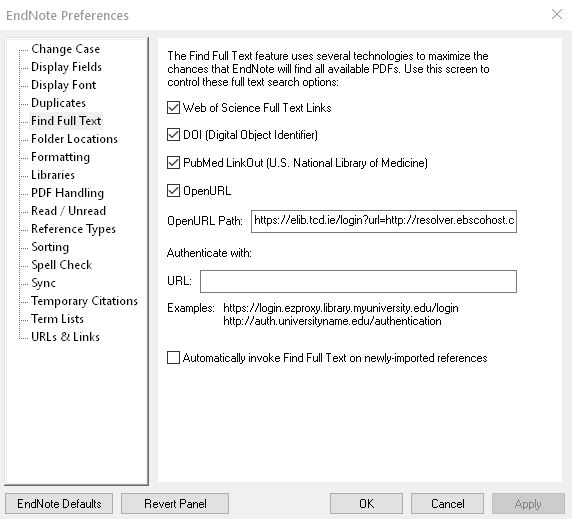
Once this is done, you can right-click on a reference in your Library and select OpenURL Link. This then opens your default browser, asks you to log-in as Trinity, and attempts to find a link using our Full Text Finder service. This will not always be successful, but even if not it is useful as a way to get the article details into a browser, where you can then use a combination of Google Scholar (especially using the Google Scholar Button browser extension), Google, and our own Lean Library browser extension to get the full text.
Once you've downloaded a PDF, you can then attach it to the reference in EndNote in a number or ways, including dragging it onto the record in EndNote.