
Learning Resources on Blackboard
All SLD learning resources are stored in Blackboard, the Learning Management System for Trinity. The module 'Academic Skills for Successful Learning', is available to all of the Trinity community and has resources for both undergraduate and postgraduate students.
The SLD Blackboard Module has been developed to provide you with a range of resources that will help you develop your independent learning and academic skills. These resources are available 24/7 from wherever you are. In this module, you will find audio and video files, downloadable documents as well as interactive websites and useful links on topics such as Essay Writing, Critical Thinking, Thesis Writing, Exam Skills, Literature Reviewing and much more.
How do I self-enrol on the 'Academic Skills for Successful Learning' Blackboard module?
ASSL-SLD - Academic Skills for Successful Learning
Log on to Blackboard (https://tcd.blackboard.com).
Click on Modules in the left menu (three lines menu in the top left corner if viewing on a mobile device).
Click on ‘Module Catalogue’ link (just the icon if viewing on mobile) in the top right corner of the screen.

Type 'Academic’ in the ‘Search Catalogue’ box and click ‘Go’. [see picture below]
Find the module called ‘ASSL-SLD’. When you put your mouse over the module code, a drop-down arrow will appear beside it. Click on the arrow.
Click on 'Enrol'
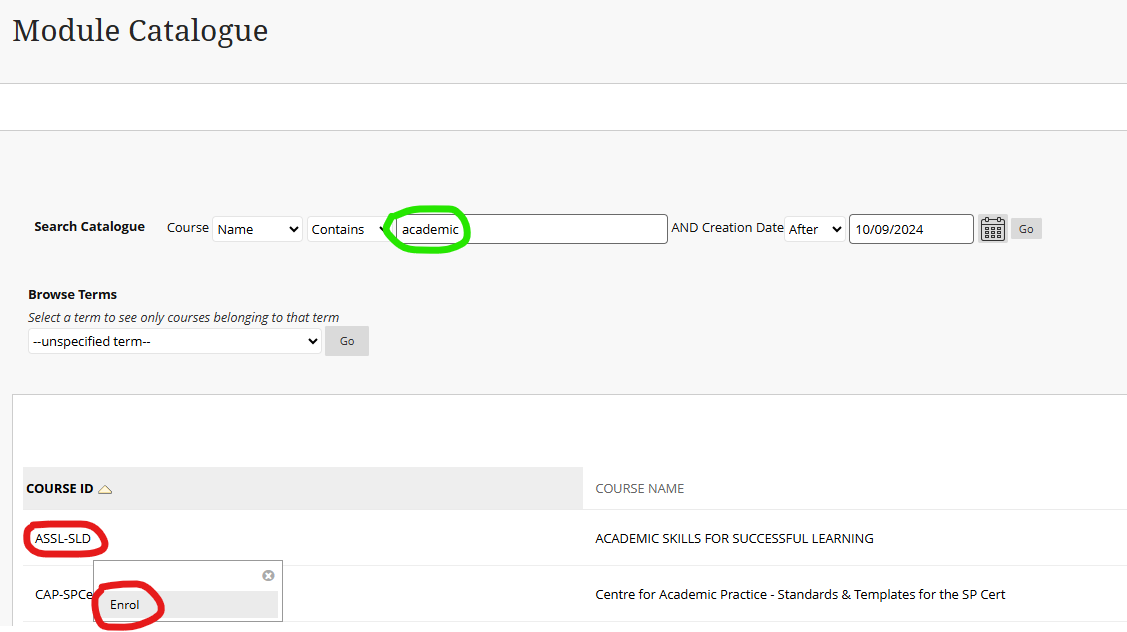
On the next page, click on ‘Submit’.
Click on ‘Modules’ in the left menu again. The module may appear at the very bottom of your module list. You can click the star icon to pin it to the top.
We hope you find this module useful. We always appreciate feedback from students, so if you have any suggestions on how to improve the module, please email us at student.learning@tcd.ie
Further Blackboard support from IT Services
For a virtual tour of TCD's Blackboard Learn platform: Click here.
For a playlist of Blackboard-related student video guides at: Click here.